Product Description
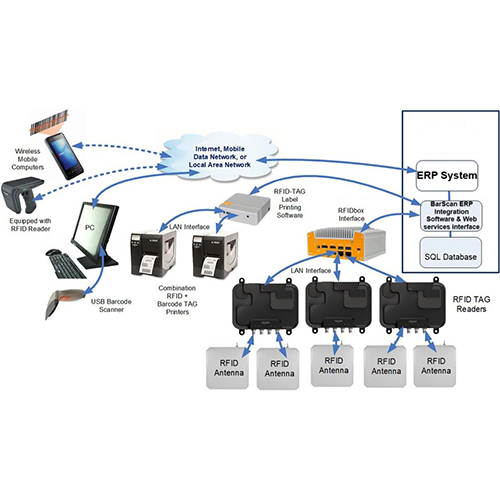
Integrating RFID with ERP systems can supercharge visibility, automation, and traceability across your operations, especially in industrial environments like yours. Here is a structured breakdown tailored to your analytical style:
Why RFID-ERP Integration Matters
- Real-time asset tracking: RFID tags update ERP databases instantly no manual input required.
- Inventory accuracy: Reduces stock discrepancies and enables automated cycle counts.
- Process automation: Triggers ERP workflows (e.g. goods receipt, WIP updates) based on RFID events.
- Compliance & audit readiness: Maintains timestamped logs for traceability and regulatory reporting.
- Reduced human error: Eliminates manual barcode scanning and data entry.
Integration Architecture
|
Component
|
Role in Integration
|
|
RFID Tags
|
Store unique IDs for assets, inventory, or WIP items
|
|
RFID Readers
|
Capture tag data at checkpoints (fixed or handheld)
|
|
Middleware/API
|
Translates RFID reads into ERP-compatible formats (XML, JSON, CSV)
|
|
ERP System
|
Receives and processes RFID data into modules like inventory, production, dispatch
|
ERP Compatibility & Tools
- SAP S/4HANA: Use SAP Auto-ID Infrastructure or integrate via REST APIs
- Microsoft Dynamics 365: Leverage Power Platform or third-party connectors
- Oracle NetSuite: Use RF-SMART or custom middleware
- Custom ERP: Build RESTful endpoints or use MQTT/HTTP bridges
Implementation Steps
- Define RFID events: What should happen when a tag is read? (e.g. update stock, trigger dispatch)
- Select hardware: Choose passive/active tags and fixed/mobile readers based on use case
- Design data flow: Map tag IDs to ERP fields (SKU, batch, location, timestamp)
- Deploy middleware: Use tools like ThingMagic Connect, TSL SDK, or custom scripts
- Test & validate: Simulate real-world workflows to ensure data accuracy and latency
- Train users: Ensure operators understand RFID checkpoints and ERP triggers
Seamless Integration for Any EnterpriseWhether you run a small business or manage a global supply chain, our RFID-ERP solution adapts to your needs. It scales easily and is compatible with major ERP platforms like SAP, Microsoft Dynamics, and Oracle, streamlining operations from inventory management to production monitoring. Middleware/API connectivity ensures straightforward integration, speeding up deployment while maintaining data consistency.
Deploy Your Way: On-Premise or CloudChoose the deployment type that suits your business operations. Both on-premise and cloud-based setups are available, providing flexibility in system management and data accessibility. Our implementation process typically takes 4-8 weeks, with dedicated experts guiding each phase for optimal performance and minimum disruption.
Robust Security and ComplianceRest assured with comprehensive security features, including SSL encryption and role-based access control, ensuring data protection across all operations. The solution complies with ISO/IEC 18000 RFID and IT security standards, helping meet regulatory requirements in India. Periodic system health checks and 24/7 support assure ongoing reliability and compliance.





 Send Inquiry


