
उत्पाद वर्णन
The main features, core functionalities, and industrial applications of barcode printing and marking software, especially relevant for high-compliance, traceability-driven environments:
Core Features
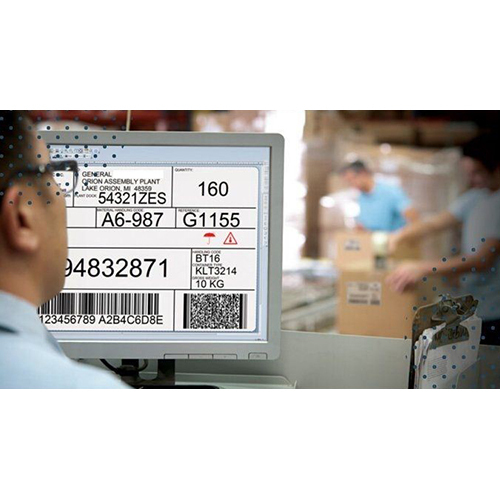
- Label Design Tools
Drag-and-drop interfaces, WYSIWYG editors, and template libraries for 1D/2D barcodes, QR codes, and RFID tags.
- Symbology Support
Includes Code 39, Code 128, UPC, EAN, Data Matrix, PDF417, GS1, and custom formats.
- Database Connectivity
Integration with SQL, Excel, Access, ERP/WMS systems for dynamic data-driven label generation.
- Print Automation & Batch Processing
Scheduled or triggered printing via APIs, command-line tools, or event-based workflows.
- Compliance Templates
Prebuilt formats for AIAG, VDA, GHS, UDI, and other industry standards.
- Security & Audit Trails
Role-based access, digital signatures, and logging for FDA 21 CFR Part 11 or ISO compliance.
- RFID Encoding
Support for HF/UHF tags, EPC formats, and smart label programming.
Functional Capabilities
- Multi-Printer Support
Compatibility with thermal, inkjet, laser, and industrial printers (Zebra, SATO, TSC, etc.).
- Cloud & On-Prem Deployment
Options for centralized control or local installations depending on infrastructure.
- Scripting & Custom Logic
VBScript, JavaScript, or proprietary scripting engines for conditional printing and data manipulation.
- मोबाइल & Web Access
Remote label design and printing via browser or mobile apps.
- Label Versioning & Approval Workflows
Useful for regulated industries requiring change control and documentation.
Industrial Applications
|
Industry
|
Use Case Examples
|
|
Manufacturing
|
Work-in-progress tracking, serialized part labeling, quality control documentation
|
|
Automotive
|
AIAG/VDA-compliant labels, VIN tracking, supplier part traceability
|
|
Pharma & Healthcare
|
UDI labeling, cold chain traceability, specimen tracking
|
|
Retail & FMCG
|
Shelf labels, price tags, promotional QR codes
|
|
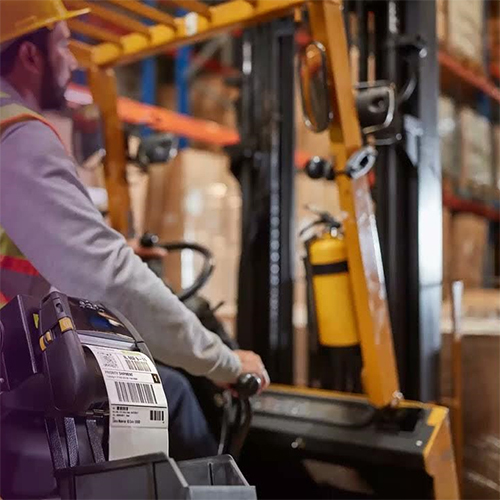
Logistics & Warehousing
|
Pallet labeling, shipment tracking, cross-docking automation
|
|
Electronics
|
ESD-compliant labels, component serialization, warranty tracking
|
|
Oil & Gas / Harsh Environments
|
Durable labels for pipes, valves, and equipment exposed to chemicals or heat
|
Seamless Database IntegrationThe software supports direct connectivity to popular databases like SQL and Microsoft Access, allowing users to fetch product details for rapid barcode generation. This eliminates manual data entry, saving time and reducing errors. Database integration also enables easier management and retrieval of barcode records, streamlining operations in busy business environments.
Versatile Licensing for Every NeedChoose between single user or network license options based on your organizations requirements. Single user licenses are ideal for independent use, while network licenses facilitate collaborative barcode printing across multiple workstations. Flexible licensing ensures your business can scale efficiently, supporting both small teams and large enterprises.
FAQs of Barcode Printing Marking Software:
Q: How can I install the Barcode Printing Marking Software?
A: You can install the software using either the online installer, which requires an active internet connection, or the offline installer, suited for environments without internet access. The installation process is straightforward and guided.
Q: What licensing options are available for the software?
A: Barcode Printing Marking Software is available with both single user licenses, for individual installations, and network licenses, which allow multiple users within an organization to access and utilize the software simultaneously.
Q: When will I receive periodic software updates?
A: Periodic software updates are released according to the developers schedule and can be accessed as part of your license. These updates ensure your software remains secure and introduces new features and improvements.
Q: Where can I access technical support if I encounter issues?
A: Technical support is accessible through phone, email, and remote assistance, ensuring you have help whenever necessary regardless of your physical location.
Q: What is the process for batch printing barcodes using the software?
A: To batch print barcodes, import your product data from a supported database, select the mass generation option, configure printing settings, and initiate the batch job. The software will generate and print multiple barcodes efficiently.
Q: How does multi-language support benefit users?
A: Multi-language support allows users to operate the software in their preferred language, improving accessibility and usability for teams with diverse language requirements.
Q: What are the minimum system requirements for installation?
A: The software requires at least 2GB RAM, a 1GHz processor, and 500MB of available hard disk space for smooth operation.